How to Export LinkedIn Post Reactions to a CSV (Without Sales Navigator)
TL;DR: You spotted a post loaded with reactions from people who might be your prospects, but LinkedIn gives you no way to export that list. The fix is a way to automatically export the reactions to a sheet, already filtered by job title, so you end up with a prospect list instead of a wall of names.
You’re scrolling LinkedIn and you hit one of those posts. Thought leadership, picked up a few hundred reactions, and it happens to be talking about exactly the thing you sell.
You know from experience that your buyers are in that list, because the post speaks to a real problem they have. If you could export everyone who reacted right now, you’d do it in a heartbeat.
It’s a genuinely good list too. Everyone on it just told you, in public, that they care about this exact topic, and you’d walk in with a real icebreaker: the post itself. Not “noticed you work in X,” but “saw you reacted to Sarah’s post on this.” That’s not cold outreach at all.
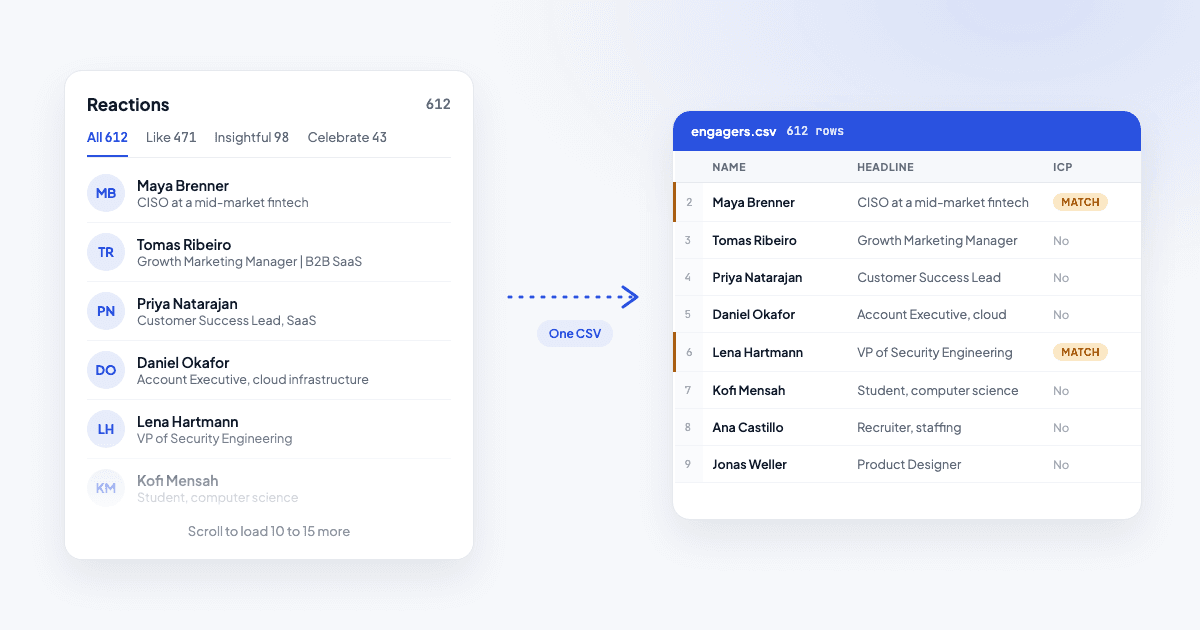
Only problem: LinkedIn doesn’t hand you that list. Your one way in is to click “reactions” and scroll to load more people. About 10 to 15 names show up each time you scroll, and the popup won’t give you a profile URL, so you open every one of those profiles by hand to copy the name, the headline, and the URL.
Then you read every headline and guess who’s actually worth a message.
There’s a faster way to get that same list into a spreadsheet, already filtered, in about a minute.
Does LinkedIn have a built-in way to export post likes?
No. LinkedIn doesn’t build an export button for the people who reacted to or commented on a post. Most social platforms work the same way, with no download option anywhere.
“LinkedIn doesn’t help you get this valuable data you’re interested in.”
The reactions list is scroll-only. You can read every name, but you can’t select, sort, or download it. If you want that list as usable data, something has to fetch it for you.
How do I export LinkedIn post likes to CSV?
Before reaching for a tool, it’s worth seeing what the manual route actually costs. Open the reactions popup, copy a name and headline, click into the profile for the URL, then repeat.
“The first 30 feel quick, then it turns into slow repetitive work.”
A post with a few hundred reactions turns into an hour or more of that.
The tool-based version skips the copy-paste part:
- Paste the post URL. A tool fetches everyone who reacted and commented, and dedupes anyone who did both.
- It pulls each person’s name, headline, and LinkedIn URL, since that’s the public data on the reactions list.
- You download a CSV: one row per person, ready for Excel, Sheets, or a CRM import.
That gets you the raw list. It doesn’t tell you who’s actually worth messaging, which is the next problem.
How many reactions are visible on one post?
LinkedIn caps the reactor list at roughly 1,218 people per post, even if the reaction count shown is higher. For the vast majority of posts, that’s the complete list.
On a rare mega-viral post past the cap, you’re working with a large sample. That cap lives on LinkedIn’s side, and no export tool can lift it.
How do I tell which engagers actually match my ICP?
By eye, this is the slow part: you read a few hundred headlines and guess. Picture doing that for a real list: by name 150 you’re skimming instead of reading, and titles that would’ve mattered start blending into everything else.
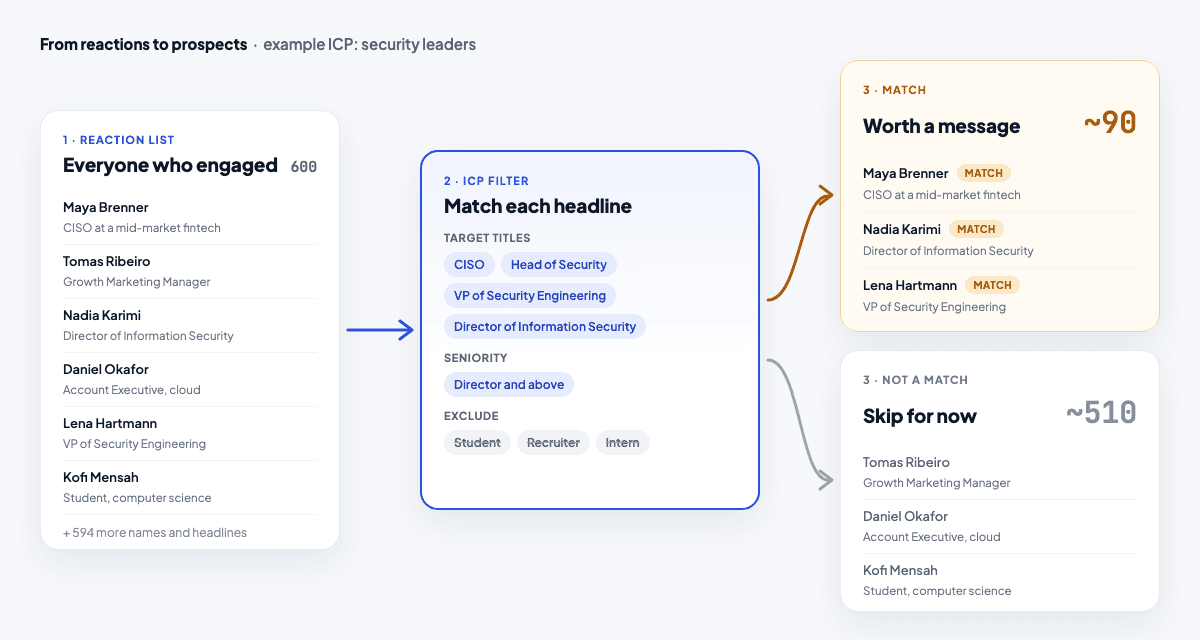
Say you sell to security leaders: CISO, Head of Security, VP of Security Engineering. Scanning by eye, you might miss that “Director of Information Security” matches too, or spend ten minutes reading through headlines like “Marketing Manager” that never had a chance.
Filtering by job title fixes that. The method is simple whether you do it by hand in a sheet or hand it to a tool: match each headline against your target titles and split the list into people who match and people who don’t.
Do that across a real list and a 600-person post turns into roughly 90 worth messaging. More on the strategy side in ICP-filtered engagement prospecting.
How ReactedTo does this
Paste a post URL into ReactedTo and it fetches everyone who reacted or commented, dedupes them, and filters each person against your ICP using their LinkedIn headline. You set your ICP once (target titles, an optional seniority range, titles to exclude), and it does the matching for you.
For each match you get their name, headline, LinkedIn URL, and a category and confidence score, plus the post they engaged with as your opener, so your first message can reference what the post was actually about. Typically about 15% of a post’s engagers match a given ICP: roughly 90 people out of 600.
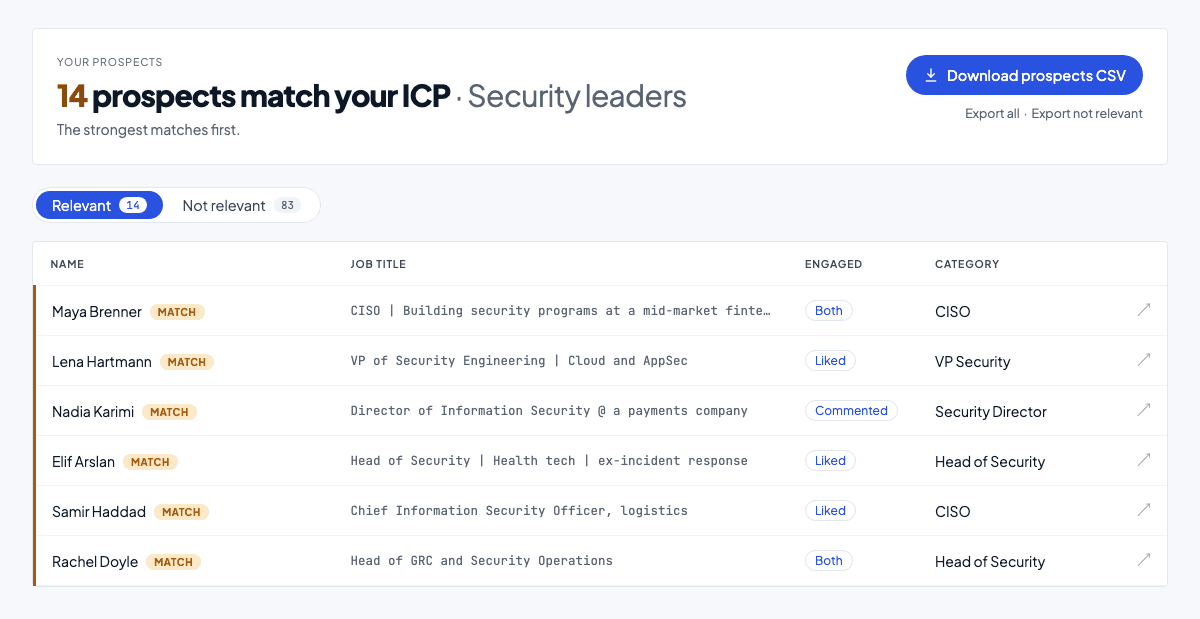
The whole thing takes about a minute, and you can give it a test for free.
Pick a post you actually care about, paste it in, get the relevant people out of it in minutes.
Frequently asked questions
Can you export LinkedIn post likes to Excel or Google Sheets?
- Yes, indirectly. A CSV export opens straight in Excel, Google Sheets, or Numbers: double-click it or use File > Open. Each row is one engager: name, LinkedIn URL, headline, category, and confidence, so you can sort and filter it like any spreadsheet once it's in.
Can I export comments and reaction details?
- Depends on the export, but most give you name, LinkedIn URL, and headline for every engager, since that's the public data available. A tool that also classifies people usually adds a category and confidence score per row, so you can see who matched your ICP without opening every profile yourself.
Do you need Sales Navigator to see who liked a post?
- No. Sales Navigator is a strong search and prospecting tool, built for finding people through filters. Exporting a specific post's reaction list is a different job, and Sales Navigator doesn't do that. A purpose-built export tool works straight from the post URL, no Sales Navigator subscription needed.
Is it safe to export LinkedIn post reactions?
- Depends on the tool. Browser extensions that log into your LinkedIn account and act through your session carry the most risk, that's what tends to get flagged. Tools that fetch public engagement data without asking for your LinkedIn login carry less risk, since your account isn't doing anything automated. No tool can promise zero risk, so treat that difference as useful context when you're deciding what to try.
Turn a LinkedIn post’s reactions into a filtered prospect list.
Paste a post URL, pick an ICP, get a filtered list in about a minute. You can give it a test for free.
Try ReactedTo free→